How to Use Our Bespoke Rug Designer


Designing a bespoke rug is much easier when you can see your choices taking shape. Our Rug Builder lets you explore materials, compare weaves, try different colours and add a border before entering the final size.
You can take your time, pin favourite combinations to your board and return to the ones you like most. Nothing needs to be decided at the first click.
This guide takes you through the Rug Builder as it appears on the website, from choosing the rug material to placing your order.
Before you begin
We all need a bit of help to get started and if you'd like some help picking the right material, feel free to call us on 03330344403 or email us contact@naturalrugcompany.co.uk and our team of designers will walk you through the best materials.
Want some design inspiration before you get started... Pick a material below and you'll be taken to our category pages were popular Rug and Border pairings are collected to browse through.
It helps to have a rough idea of where your rug will sit, but you do not need to know every detail before opening the builder. Part of the fun is using it to spark new creative ideas, so feel free to experiment.
If you already have measurements, keep them nearby. If not, start by exploring the materials and colours. You can focus on the size once you have found a design you like.
The large preview to the left (at the top on mobile) of the builder updates as you make your choices. This gives you a clear view of how the rug material and border look together.

Ready to get started?
Step 1: Choose your Bespoke Natural Rug Material

Open the Material section and choose from the material types available in the builder:
Sisal, Wool,
Seagrass or Sisool
Each has its own look and character. Sisal has a naturally textured appearance, wool feels softer and fuller, seagrass has a distinctive natural finish, and Sisool combines the qualities of sisal and wool.
For more information about each weave check out our Rug Fibre Guide.
Click the material you would like to explore. The builder will show the relevant ranges and choices for that material.
For the next step I will go ahead and select Sisal.
If you are changing an existing design, select Change Rug Weave. The material currently used in your design will already be selected, so you can compare other weaves without losing your place.
Step 2: Find the Right Weave
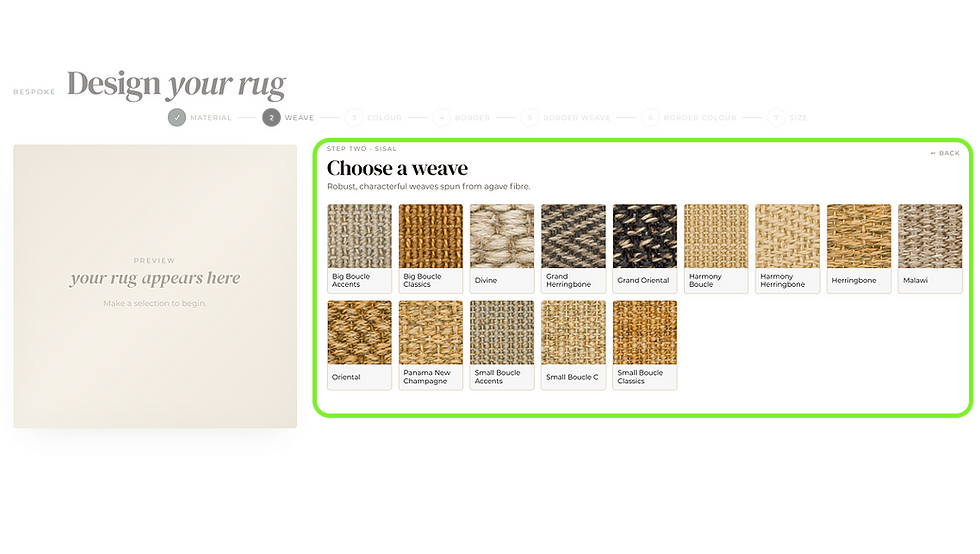
Once you have selected a material, browse the available weaves and styles.
Seagrass and Sisool are presented more directly, with the available options shown together, because there are fewer sub categories. Choose the one that catches your eye and look at the main preview to see it at a larger scale.
You can also use the search control when you already know a range name, product code or colour. This is particularly useful if you have seen a sample elsewhere on our website and want to find it quickly in the Rug Builder.
For the next step I will go ahead and select Sisal Harmoney Boucle which has a lovely collection of colours.
Step 3: Choose the Weave Colour

After selecting a weave, the available colour variants appear where that range has more than one option.
Click a swatch to apply it to your rug. The centre image will update, letting you compare the colour with the texture of the weave rather than judging a small swatch on its own.

You can see from the image above that the preview area now has the selected rug material added. You're well on your way to your perfect rug creation!
Made a mistake? Just click Change Weave to go back to the weave selection step.
It can help if you have a particular palette in mind. You might begin with Natural, Beige or Cream for a quiet interior, or browse tones such as Brown, Grey, Green, Blue or Black when the rug needs more depth. Other colour families are available within the builder, depending on the selected material and range.
Try a few options, even if you arrived with a favourite in mind. Natural fibres can look quite different once the texture and colour are viewed together.
Step 4: Outer Border Material

The Border section now opens.
Borders are grouped by category, so related options such as Cotton, Linen, Leather and Wool are kept together. Choose a category and browse all the options available within it.
Need some help on borders? We have a Border Guide to help
Here's a quick list of all our border options:
Cotton Herringbone: Timeless chevron pattern available in a variety of sophisticated colours.
Cotton Chenille: Soft and luxurious, with rich, speckled tones that add depth and texture.
Linen Basketweave: Strong and durable, with high moisture absorbency and quick-drying properties.
Linen Boucle: Elegant and understated texture, environmentally friendly.
Linen Twill: Our largest linen offering, with a dazzling array of colours.
Cotton Striped: Elegant and versatile, adding harmonious balance to your rug's borders.
Vintage Leather: Exudes sophistication and luxury, with a rich texture and easy maintenance.
Heritage Leather: Smooth and luxurious, offering a tidy finish with minimal maintenance.
Rustic Leather: Aged and visually captivating, perfect for high-traffic areas.
Wool Felt: Soft texture and excellent durability, with superior sound insulation.
Borders are a standard 5.5cm that is included in the area of the rug. So if you go on to order a 200cm x 150cm Rug, you will get exactly that size, border included.
Style Guide: A border selected in a similar tone creates a calm, tailored edge. A darker border gives the rug more definition, a stronger frame, whilst an accent colour like green, red or blue can connect it with furniture, artwork or another feature in the room. Leather shines here, selecting a leather border to compliment wooden furniture or a leather armchair can instantly unify a space.
For the next Step I'll select Linen.
Step 5: Border Weave Style

Similar to the Rug Weaves within Rug Material, Linen has three styles within it. A broader basketweave, tight knitt twill or a stylish Boucle.
The rug material is Boucle, so it might chime nicely. But I think I'll select Linen Twill,
because I have just the right pairing in mind.
Step 6: The All Important Border Colour Step

This is my favourite stage of the rug designer. You can now look through all the colours that Linen Twill has to offer. Choose something bold to make an impact. Select something more subtle to hamonise with your existing decor. The choice is yours.
I'll pick the one I want LT2 Marble.
Doesn't it look fantastic!

Now we're passed straight over to the summary.
Step 7: Bespoke Rug Summary

You're all done on your custom Rug! The summary area allows you to click and type in your preferred size.C
Below the size are a few buttons to select standard sizes for different areas of the home. Typical sizes help you get started and we have a range of size guides for different rooms to explore, check them out below:
We make our rugs bespoke, everything made to order in just 3-4 weeks. You can select your dimensions to the nearest 1cm. They are hand crafted and so there is a +/-10mm tolerance.
Some Tips on Size: Measure the space carefully rather than choosing the nearest familiar rug size. A bespoke rug works best when its proportions are based on the room and the furniture around it.
Masking tape can help you check the footprint before entering the final measurements. Mark the outline on the floor, make sure doors can open freely and check how the rug sits beneath nearby furniture.
The final screen brings your design, dimensions and price together, so you can review everything in one place.
Rug Pricing
Once you've typed in the size you require, you'll see the price dynamically. It will recalculate to any adjustment you want to make, so there is no guessing.
You can checkout straight away by selecting Add To Basket.
Or Order Samples to be sure before you comit.
Below is a more detailed breakdown of the summary screen, but all the teps are complete. Your new made to measure Bespoke Rug is only a click away. Once your new rug is added to basket you can apply a coupon from the current offers running and checkout.
Thanks so much in advance the Rug Builder is designed to let you explore, not rush you through a fixed set of choices. Begin with the natural material you like, find a weave with the right character and use the border to bring the design together.
By the time you reach the size and pricing screen, you will have seen how the important details work as a complete rug.
Ready to start? Open our Rug Builder and create your bespoke natural rug.
FAQ - Rug Design Questions
What can I choose in the Rug Builder?
The Rug Builder lets you bring the main parts of your rug together before ordering. You can choose the rug material, explore weaves and colours, add an outer border and enter the finished dimensions. The central preview updates as you work, helping you see the rug and border as one design.
Which rug materials are available?
You can explore Sisal, Wool, Seagrass and Sisool. Each material has its own appearance and feel, so the best choice depends on the room, the amount of use it receives and how soft or textured you want the finished rug to be.
How do I find a particular weave or colour?
Begin by selecting the material. For Sisal and Wool, the builder uses style groups to help you narrow the collection. Seagrass and Sisool options are shown more directly. Where a weave is available in several colours, the colour variants appear beneath the preview.
Does the preview show my actual rug?
The preview is a helpful visual guide to the relationship between the rug material and border. Screens display colours differently, and natural fibres can contain subtle variations, so it should not be treated as an exact colour match. If the precise tone and texture are important to your decision, view a physical sample before ordering.
Can I change the rug after reaching the summary screen?
Yes. Select Change Rug Weave to revisit the material choices or Change Border Colour to look at the borders again. Your current option will already be selected, and you will remain on the final size, pricing and summary screen while making the change.
Why add a border to a rug?
A border protects and finishes the edge while giving the rug a more tailored appearance. It can blend quietly with the centre or create a clear frame around it. On a made-to-measure rug, the border is also an opportunity to connect the design with colours elsewhere in the room.
Should the border match the rug?
It does not have to. A close tonal match feels calm and understated. A darker border sharpens the outline, while a contrasting colour makes more of a statement. Look at the full room rather than matching the border to the rug alone.
Added Info - Summary Section Guide


1) Sizing - Select to the whole CM. Our rugs are made to your exact sizing, border included in the dimensions.
2) Standard Sizes - These options allow you to quickly select an area rug size or a runner in a common size, you can be confident it will fit a space in tried and tested design shapes.

3) Customisation - This is a breakdown of the Material Choices your have made so far with the Material Codes for each. You've selected your rug, but you might want to change things.
If you want to change the weave click Change Weave, the rug designer will present a pop-up to change your preferences. You can even search by colour, pattern or material code.
If you want to change the border click Change Border, the rug desiger will pop-up options for you. It will first show you similar borders, if you want to check other similar options. Want to change it totally, select 'Clear Filtering' and you will be able to select any border from the entire range.

4) Area and Price per m2 - In this area you can see a breakdown of the Rug and Border area calculations and the pricing of the materials at an m2 and linear m level. If you've added Anti-Slip and Intec Stain Protection, they will also appear here.
5) Change Weave and Border - We've added the option to mix things up again here.
If you want to change the weave click Change Weave, the rug designer will present a pop-up to change your preferences. You can even search by colour, pattern or material code.
If you want to change the border click Change Border, the rug desiger will pop-up options for you. It will first show you similar borders, if you want to check other similar options. Want to change it totally, select 'Clear Filtering' and you will be able to select any border from the entire range.
6) Final Total - Subtotal, VAT and Total is all provided here.

7) Add Ons
Intec Stain Protection - Intec Stain Protection was originally designed and developed for high-traffic commercial applications. Locations like retail stores and hotels needed a comprehensive stain protection that offered lasting defence against wear and tear, dirt particulates and spills. This innovative water-based treatment was the result of that effort and it can offer a huge benefit when applied to your household rug too.
Invisible & Odourless: Intec forms an invisible, odourless and non-toxic barrier that coats
each and every fibre in the weave of your Natural Rug, ensuring that they retain their
natural colour and are easier to care for.
Anti-Static: It utilises an anti-static agent that prevents the attraction of dry soils,
ensuring that they can be removed simply and efficiently with nothing more than
your regular vacuuming schedule. That extra shield also ensures that the regular
abrasive influence of foot traffic is minimised, which makes it ideal
for Hallway Runners and Stair Runners.
Anti-Spill: The liquid prevention coating means that any spills can be absorbed
by blotting with an absorbent cloth meaning that there is a reduced likelihood
that liquids will be absorbed by the Rug Fibre and cause staining. This ensures
that any Dining Area Rug would be at a huge disadvantage without
Intec's impeccable defence.
This small investment at the point of creating your rug ensures that you have peace of mind when enjoying your new purchase.
Want to learn more? Check out our Intec Guide
Anti-Slip - Anti-Slip is usally a good investment. It will reduce tripping, make cleaning easier and help protect your rug and floor over time. There are times when adding Anti-Slip is worth particular consideation. A smaller or lighter rug has less weight to keep it in place and may be more likely to move during everyday use. The same applies to rugs sitting freely in the middle of a room without furniture resting on them.
Want some advice? Just reach out and Contact Us

8) Add To Basket - To Add Your Rug To Basket Straight Away
9) Order Samples - We know how tricky it can be to order online these days. So we offer a free sample service. Clicking this option will add the elements of your rug into the basket as samples to checkout for free. You'll get your sames in 3-5 working days (often sooner). If you want to add a few, feel free.
10) Start Over - Will reset the whole rug builder to start over. Great if you've just added samples to your basket, but want to add some more.


Comments